

In most enterprises, a business question travels a long road before it becomes an answer. A stakeholder asks something, an analyst joins a backlog, a dashboard gets scoped, and a week later a report lands that answers a question the business has already moved past. The friction isn’t the data warehouse itself — BigQuery scales beautifully. The friction is the queue of humans and tools that sit between the question and the query.
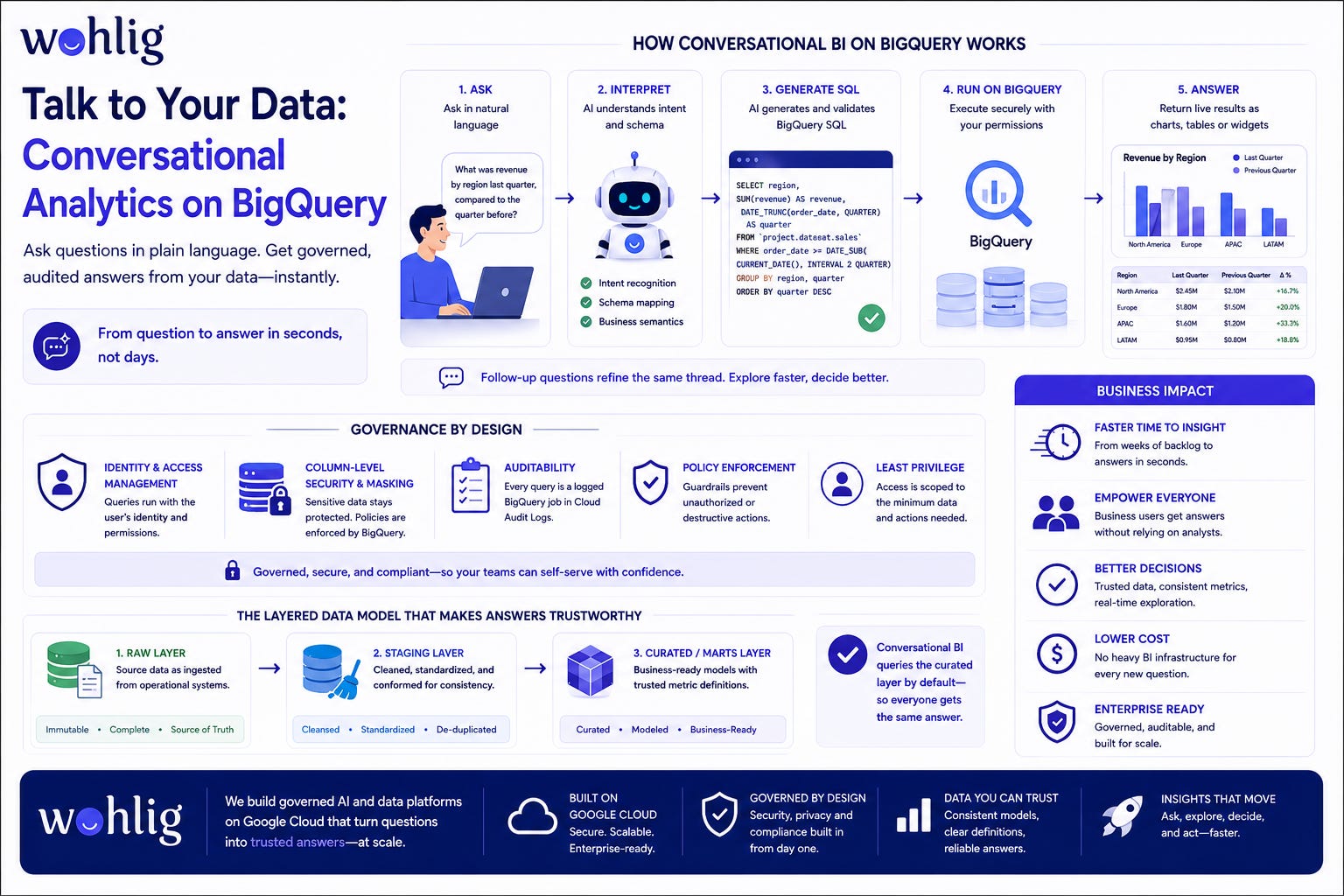
Conversational analytics removes most of that queue. Instead of standing up heavy BI infrastructure for every new line of inquiry, a person types a question the way they’d ask a colleague. An AI assistant interprets the intent, writes the SQL, runs it against BigQuery through a governed connector, and returns a live chart, table or interactive widget the person can read immediately. Follow-up questions refine the same thread, so exploration feels like a conversation rather than a series of tickets — and because the assistant queries through your existing IAM, column-level security and audit logging, you get the speed without loosening control.
How conversational BI on BigQuery actually works
The pattern has a few moving parts, and none of them ask you to move your data off Google Cloud.
At the front is a natural-language interface. Someone asks, “What was revenue by region last quarter, and how did that compare to the quarter before?” The assistant doesn’t guess at an answer. It translates the question into SQL grounded in your actual schema, table descriptions and business definitions.
Behind that sits a connector to BigQuery. The generated query runs as a real BigQuery job, using the caller’s identity and permissions. The assistant then takes the returned rows and renders them: a bar chart when a comparison is implied, a table when detail matters, or an interactive widget when someone will want to filter and drill down. Because everything happens in one turn, the person can immediately ask the next question, and the assistant carries the context forward.
The key design principle is that the AI writes and executes queries, but it doesn’t become a new, ungoverned door into your data. It queries through the same controls you already trust.
Governance is the feature, not an afterthought
For a CTO or data leader, the first question isn’t “Can it answer?” It’s “Can it answer safely?” Conversational analytics done properly leans on the governance primitives Google Cloud already provides, rather than inventing a parallel security model.
Identity and access management decides what each person can query. When the assistant runs a query, it runs under a governed identity mapped to the requester, so someone who can’t see a dataset in BigQuery can’t see it through the assistant either. Access doesn’t widen simply because the interface changed.
Column-level security and data masking mean sensitive fields stay protected regardless of how a question is phrased. If a column is restricted, the assistant can’t surface it, and no clever prompt reroutes around the policy — because the policy lives in BigQuery, not in the chat layer.
Auditability closes the loop. Every query the assistant runs is a logged BigQuery job, visible in Cloud Audit Logs like any other. You can review what was asked, what SQL ran, who it ran as, and what it touched. That record is what turns a convenient tool into one your security and compliance teams can sign off on.
The layered data model that makes answers trustworthy
Conversational answers are only as good as the data model underneath them. Pointing an AI assistant at raw, inconsistent tables produces fast answers that are quietly wrong. A layered model prevents that.
The raw layer holds source data as ingested, unchanged, so you always have fidelity to the system of record. The staging layer cleans and standardises: consistent types, deduplicated records, normalised keys and shared naming. The marts layer, or curated layer, shapes data into business-ready models where metrics like revenue, active users or margin are defined once and defined consistently.
Conversational analytics should query the curated layer by default. When “revenue” has a single agreed definition in a mart, every question that mentions revenue resolves to the same logic, whoever asks. This is what keeps two people from getting two different numbers for the same question — the fastest way to lose trust in any analytics tool. The layered model also gives the assistant clean, well-described tables to reason over, which improves the accuracy of the SQL it generates.
Why this collapses time-to-insight
The gain isn’t only speed, though the speed is real. When a self-serve question no longer needs an analyst in the loop, the analyst is freed for the deeper work that genuinely needs a human: modelling, investigation, and building the curated layer everything else depends on. Routine questions get answered in the moment, and complex ones get better attention.
Adoption widens too. People who would never open a SQL console will ask a question in plain language. That pulls more of the organisation into evidence-based decisions without adding headcount to the data team. And because every answer is governed and audited, broader access doesn’t translate into broader risk.
How Wohlig helps
Wohlig Transformations is a Google Cloud transformation and AI partner. We design and build conversational analytics on BigQuery end to end: the layered data model from raw to staging to marts, the governed connector that respects your IAM and column-level security, the audit trail your compliance team needs, and the agentic AI layer that turns plain-language questions into trustworthy, live results.
If your teams are waiting in report queues while your data warehouse sits underused, let us show you what conversational BI on BigQuery looks like in your environment. Reach out to Wohlig to scope a path from question to insight that your data leaders can stand behind.